


Package Tracker - Track Parcel
4.3175.00 Reviews
App Specs
- Version
- 3.5
- Updated On
- License
- Free
- Downloads
- 100,000+
- Developer
- NOGAME LABS
- Categories
- Shopping
- Platform
- Android
Screenshots
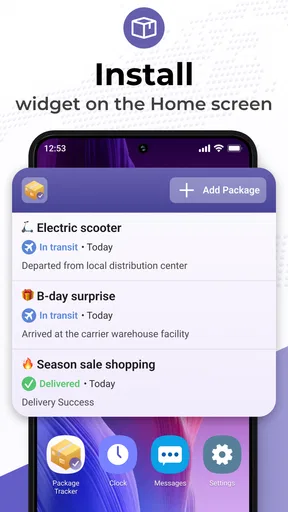
 Analysis by AppCompare
When I’m expecting parcels from several shops, the frustrating part isn’t always the wait; it’s remembering which carrier has each order and where to look for the latest update. Package Tracker - Track Parcel brings that checking into one place, which makes it most useful when deliveries overlap rather than when I’m following a single shipment.
What one tracking screen can—and cannot—do
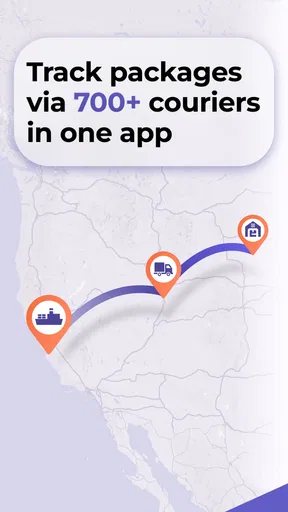
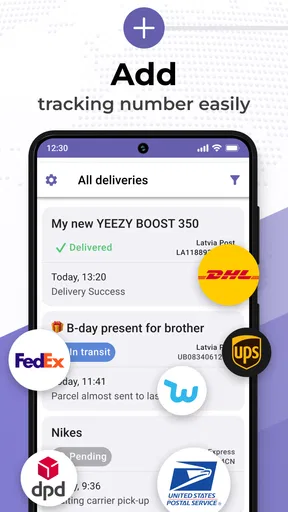
This is a shopping utility from NOGAME LABS, built around keeping an eye on shipments rather than placing orders or managing a store. The app’s reach across major services such as FedEx, UPS, USPS, DHL and AliExpress, along with many other carriers, is its clearest practical advantage. I can use one tracker for an order from a large retailer and another parcel handled by a less familiar courier, instead of switching between several carrier apps.
That convenience does not make the app a delivery guarantee. A tracking screen can only be as current as the information available for a shipment, and a quiet period does not necessarily mean the parcel has stopped moving. I treat the app as a convenient way to gather status updates, not as a substitute for the carrier’s own page when a delivery becomes urgent or an exception needs attention.
A more useful routine for several orders
The app makes more sense once I have a few parcels in transit. Adding a short, recognizable name or note to a tracking number is a small but worthwhile habit: “birthday gift” or “desk lamp” is easier to scan than a string of digits. It also helps when two orders arrive close together or when a shop splits one purchase into separate shipments.
For a household that shares shopping, I would use those labels to distinguish who is expecting what before checking the carrier. That avoids opening the wrong entry when someone asks whether their delivery has moved. If you track work and personal purchases together, a simple label can also make it easier to spot which parcel needs attention first.
Speed expectations and busy periods
In ordinary use, I want a tracker to open quickly, make the current shipment easy to find, and avoid turning a brief status check into a chore. The existing experience is described as responsive, but expectations should stay realistic: the app can present carrier updates conveniently, while the arrival of new tracking information depends on the shipment’s carrier and its scan activity. A parcel may travel for a while without a fresh event, even when the app itself is working normally.
The busiest moment is often not adding one parcel but sorting through several at once—after a shopping weekend, before a move, or while coordinating gifts for different people. Names and notes are particularly useful then. I would add shipments as soon as I receive their tracking numbers and label them immediately, rather than waiting until several indistinguishable entries have piled up.
Worth Reading Before You Choose

EA SPORTS FC Mobile 26 Is a Bigger Football Game, but It Takes Time

Flipboard Shows What News Apps Must Do Beyond the Feed

Switching to Android Auto Means Rethinking Your Driving Routine

Google Calendar Makes a Crowded Week Easier to Manage

Ludo King Makes the Most of the Minutes Between Plans

Baby Panda World Brings Quick Play to Modern Phones, but Its Game Library Feels Busy
Reliability, alerts, and a sensible backup
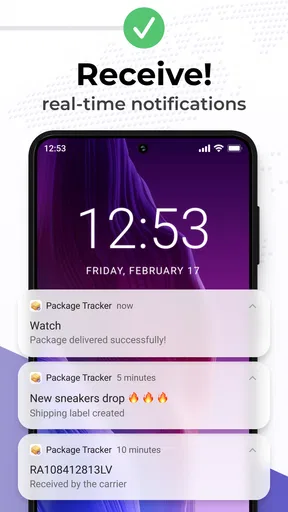
Notifications are handy when I’m waiting for a meaningful change, because they reduce the need to open the app repeatedly. Still, I would not plan a day around an alert arriving at precisely the right moment. If a delivery requires someone to be home, I’d also check the carrier’s own tracking page and any delivery instructions available there. That second check matters most when a parcel is marked delayed, delivered, or in need of action.
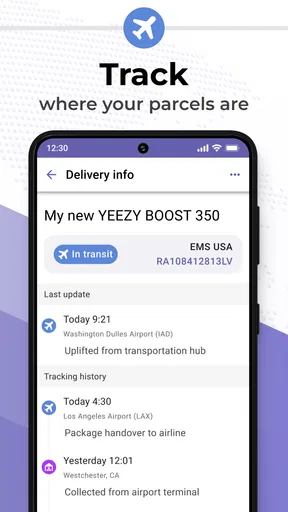
The map view can make a route easier to picture, but I see it as context rather than a precise promise of where a driver is or when a parcel will reach my door. For a routine order, that visual overview is a nice extra; for a time-sensitive shipment, the written carrier status is the more useful detail to verify.
Who will get the most from it
I’d recommend this app to frequent online shoppers, people receiving parcels from different carriers, and anyone who finds it annoying to keep multiple tracking pages in browser tabs. It can also help a small seller keep personal tabs on outgoing orders, although it is a parcel-following tool, not a replacement for a full business shipping system.
It is less compelling if you usually have only one parcel at a time and already find the retailer’s order page clear enough. Someone who needs to change a delivery, report a missing parcel, or resolve a payment or customs issue should go to the seller or carrier responsible; a tracking app can help show the latest status, but it is not the party that can fix those problems.
Everyday use: a delivery day with two parcels
Imagine I’m expecting a set of headphones from one shop and a gift from another, with the shipments moving through different carriers. I add both tracking numbers, give each a recognizable note, then check the list when I have a spare moment instead of searching two confirmation emails. If an alert arrives, I can see which order changed; if the map or status stays still, I know to avoid assuming that the delivery has failed and can check the carrier directly when timing matters.
That workflow is simple, but it captures the app’s real value: less time spent remembering where to check and less chance of confusing one order with another. It does not remove the uncertainty of shipping, and it cannot make carrier scans appear sooner. It makes the information easier to keep together.
First Impressions
I downloaded Package Tracker - Track Parcel from the app store, and right from the get-go, the app impressed me with its clean and intuitive interface. Setting it up was a breeze. Within minutes, I was adding my first tracking number.
The app supports a vast array of carriers, which is perfect for someone like me who orders from various online stores. Whether it's FedEx, UPS, or even some lesser-known couriers, this app has got you covered. Just type in your tracking number, select the carrier, and voilà, your package’s journey is right at your fingertips.
Features That Stand Out
One of the standout features for me is the real-time notifications. As soon as there is any movement on my package, I get a notification. No more compulsive checking; my phone tells me when there’s news. This alone has saved me a ton of worry and time.
The app also offers a handy map view, showing the current location of the package. It's oddly satisfying to watch my delivery move across the map, getting closer and closer with each update.
Another feature I found incredibly useful is the ability to track multiple packages simultaneously. If you're like me and often have several things en route, you’ll appreciate how easy it is to keep everything organized. You can even assign names or notes to each tracking number, so you never mix up which package is which.
Usability and Performance
The performance of the app is solid. It loads quickly, the updates are prompt, and I haven’t experienced any crashes or bugs. The design is user-friendly, which makes navigation a breeze even for those who aren’t tech-savvy. Swiping between features feels smooth and responsive, contributing to an overall pleasant user experience.
Another thing worth mentioning is that the app doesn’t bombard you with ads. There are a few non-intrusive banner ads, but they don’t get in the way of using the app, which is a huge plus in my book.
Why It Matters
In today’s fast-paced world, being able to efficiently track your parcels is crucial. Whether you're running a small business or just a regular online shopper, knowing the whereabouts of your deliveries provides peace of mind. Package Tracker - Track Parcel nails this by offering a service that's both comprehensive and easy-to-use.
I've found myself recommending it to friends and family who frequently order online. It streamlines the whole tracking process, making it far less stressful and more convenient.
Choosing it over carrier apps or retailer pages
For a single shipment, a retailer’s order page or the carrier’s own app may be all I need. Those are often the better places to act on a delivery, since they belong to the seller or carrier handling it. This tracker earns its place when I’m juggling orders from different shops: one place to review them is more convenient than repeatedly searching email or switching between carrier apps.
There is a trade-off. A single dashboard is easier to scan, while the original carrier channel remains the sensible fallback for a specific delivery problem. I would keep the retailer’s confirmation email until the parcel arrives, too. It helps identify the order if I need to contact the seller, and it avoids relying on a tracking entry as the only record of a purchase.
Free to start, with practical limits
The app is free to download and is rated for Everyone. Its current version is 3.5, and it requires Android 8.0 or later. The store shows in-app purchases ranging from $2.99 to $49.99 per item, so I’d check the purchase screen carefully before choosing anything paid. If all I need is basic parcel visibility, I would first see whether the free experience covers my routine rather than assume that an upgrade is necessary.
Its public reception is encouraging but not a guarantee that every carrier or shipment will behave identically: it has a 4.3 average from around 1.1 thousand ratings, with over 100 thousand installs. Those figures suggest that many people use it, but the more important test for me is whether it recognizes the carriers behind my own orders and keeps the list clear enough to be useful.
Device fit and recovery when tracking goes quiet
Because tracking is mostly an occasional check, I don’t see a reason to keep the app open continuously. I’d open it when an order changes or when I’m planning around a delivery, then close it and let notifications do their job if I’ve enabled them. That is a practical way to avoid turning a simple utility into another screen to monitor all day.
If a number does not show an update, I would first check that I entered it correctly and selected the appropriate carrier. Then I’d compare the status with the retailer or carrier, especially if the parcel is time-sensitive. This sequence helps separate a quiet tracking history from a genuine delivery issue without repeatedly refreshing the same screen.
Final Thoughts
So, is Package Tracker - Track Parcel worth downloading? Absolutely. It’s a nifty tool for anyone who wants to keep tabs on their deliveries without the hassle. With its user-friendly interface, real-time updates, and wide carrier support, it has quickly become one of my go-to apps.
If you're tired of the constant guessing game that comes with waiting for packages, give this app a try. It might just be the little helper you didn’t know you needed.
My performance verdict
For the job it sets out to do, I value the quick, uncomplicated checks more than elaborate controls. The strongest performance benefit is organizational: a short label, a consolidated list, and a notification can save small bursts of time when several shipments are active. That is a meaningful improvement for frequent shoppers, even though it does not speed up transit itself.
I would choose it when I want a central place to watch parcels and switch to a carrier or seller when I need to take action. I would skip it if I rarely order online, prefer not to install a separate tracker, or need delivery changes and support more than status visibility. In that sense, it is a focused companion rather than an all-purpose shipping solution—and that is exactly where I find it most useful.
Pros
- User-friendly interface for easy navigation.
- Supports multiple courier services worldwide.
- Real-time tracking updates for parcels.
- Customizable notifications for delivery status.
- Offline mode available for recent tracking.
Cons
- Occasional delays in status updates.
- Limited support for lesser-known couriers.
- Ads can be intrusive in free version.
- No dark mode option available.
- Some features locked behind paywall.
FAQs for Package Tracker - Track Parcel
What features does Package Tracker - Track Parcel offer?
Package Tracker - Track Parcel provides real-time tracking for a variety of carriers worldwide. It allows users to receive notifications about package status updates, estimated delivery times, and potential delays. The app also offers a user-friendly interface to manage multiple shipments and supports barcode scanning for quick tracking number input.
Is Package Tracker - Track Parcel compatible with all shipping carriers?
While Package Tracker - Track Parcel supports a wide range of popular international and domestic carriers, it's always best to check the app’s carrier list for compatibility. Major carriers like UPS, FedEx, DHL, and USPS are typically supported, but availability may vary depending on the region and specific carrier agreements.
Does Package Tracker - Track Parcel offer offline tracking capabilities?
Package Tracker - Track Parcel primarily relies on an internet connection to provide real-time tracking and updates. However, users can access previously retrieved tracking information offline. To ensure the most accurate and up-to-date information, an internet connection is recommended when accessing the app.
Are there any costs associated with using Package Tracker - Track Parcel?
Package Tracker - Track Parcel is generally free to download and use, but it may offer premium features for a fee. These features could include advanced notification options, removal of ads, or support for additional carriers. Users should check the app store listing for specific pricing details and any in-app purchase options.
How secure is my information with Package Tracker - Track Parcel?
Package Tracker - Track Parcel prioritizes user privacy and data security. The app typically uses encryption to protect tracking numbers and personal information. However, users are advised to review the app’s privacy policy and terms of service to understand how their data is handled and to ensure they are comfortable with the security measures in place.


